GitHub - Jackett/Jackett: API Support for your favorite torrent trackers
Jackett Table of Contents - Introduction - Supported Systems - Supported Trackers - Installation - Windows Installation - Linux Installation (AMD x64) - Linux Installation (ARMv7 or above) - Linux Installation (ARMv6 or below) - macOS Installation - Docker
社区作者 · zZz
它解决什么问题
Jackett
Table of Contents
- Introduction
- Supported Systems
- Supported Trackers
- Installation
- Windows Installation
- Linux Installation (AMD x64)
- Linux Installation (ARMv7 or above)
- Linux Installation (ARMv6 or below)
- macOS Installation
Docker Installation- Other Installation Methods
- Uninstallation
- Configuration
- Running Behind Reverse Proxy
- Search Cache
- Torznab Cache
- FlareSolverr Configuration
- OMDb Configuration
- API Usage
- Torznab Query Syntax
- Search Modes and Parameters
- Filter Indexers
- Aggregate Indexers
- Command Line Options
- Building from Source
- Troubleshooting
- Contributing
Introduction
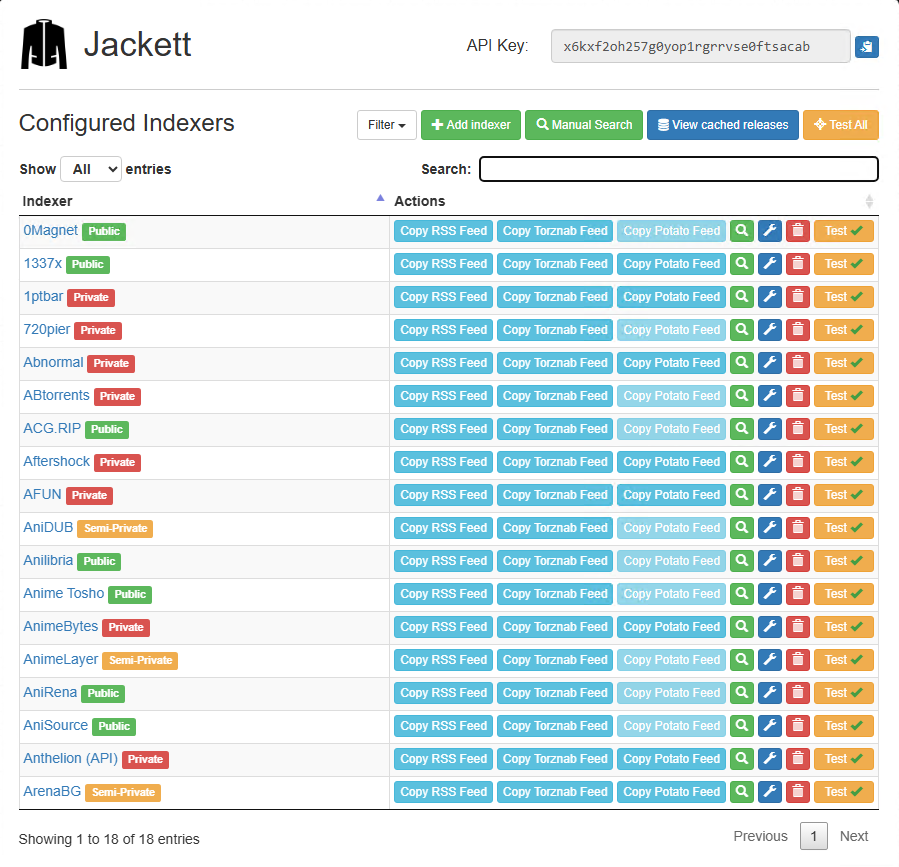
Jackett works as a proxy server that translates queries from applications ( Sonarr , Radarr , SickRage , CouchPotato , Mylar3 , Lidarr , DuckieTV , qBittorrent , Nefarious , NZBHydra2 , etc.
) into tracker-site-specific HTTP queries, parses the HTML or JSON response, and sends results back to the requesting software.
What Jackett does:
- Acts as a bridge between your apps and torrent trackers
- Provides recent uploads (similar to RSS feeds)
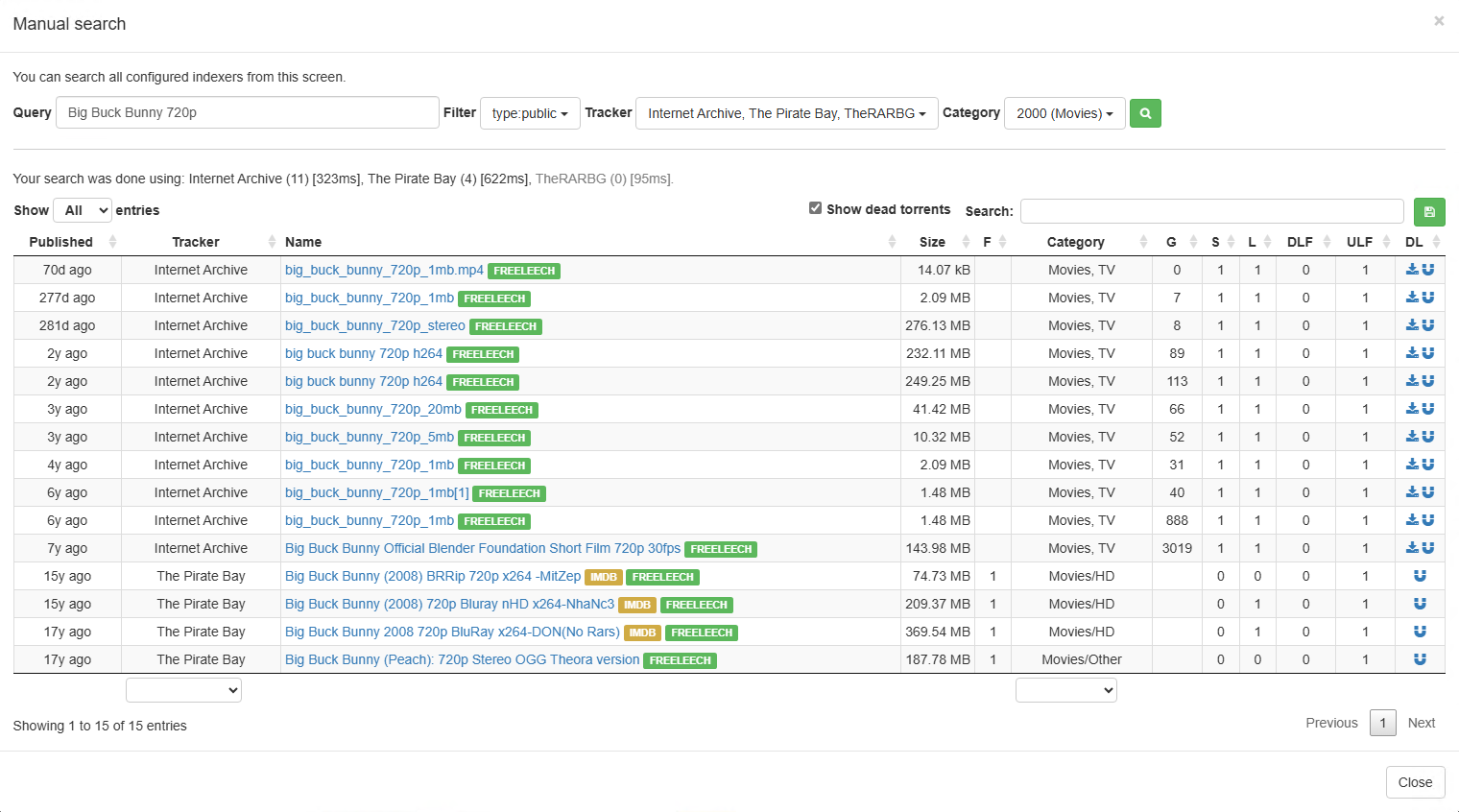
- Performs searches across multiple trackers
- Returns results in a standardized format (Torznab/TorrentPotato)
Key Features:
- Single repository of maintained indexer scraping and translation logic
- Removes the burden of tracker integration from other applications
- Supports public, semi-private and private trackers
- Implements the Torznab and TorrentPotato APIs
Developer Information
This project is recruiting development help. If you can help out please contact us .
For detailed troubleshooting and contributing guidelines, please see CONTRIBUTING.md
A third-party Golang SDK for Jackett is available from webtor-io/go-jackett
Note: The Discord server is no longer maintained. If you have a problem, request, or question, please open a new issue on GitHub .
Supported Systems
The currently supported version of Jackett is 0.24.+ , which is compatible with:
- Windows: Windows 10 Version 1607 or greater ( full list )
- Linux: Various distributions ( full list )
- macOS: macOS 13.0+ (Ventura) or greater ( full list )
Prior versions of Jackett are no longer supported.
Supported Trackers
Supported Public Trackers
- ØMagnet
- 1337x
- 52BT
- ACG.RIP
- Anibt
- AniLibria
- AniRena
- AniSource
- ApacheTorrent
- AudioBook Bay (ABB)
- Bangumi Moe
- BigFANGroup
- BlueRoms
- BT.etree
- BTdirectory (BT目录)
- Byrutor
- Catorrent
- CrackingPatching
- DaMagNet
- DivxTotal
- dmhy
- DonTorrent
- E-Hentai
- EBook Bay (EBB)
- EpubLibre
- ExtraTorrent.st
- EZTV
- FileMood
- Free JAV Torrent
- GamesTorrents
- HDRTorrent
- Internet Archive (archive.org)
- kickasstorrents.to
- kickasstorrents.ws
- Knaben
- LimeTorrents
- LinuxTracker
- Mac Torrents Download
- Magnet Cat
- MagnetDownload
- Magnetz
- MegaPeer
- MejorTorrent
- Mikan
- MixTapeTorrent
- MyPornClub
- nekoBT
- NewStudio
- Nipponsei
- NoNaMe Club (NNM-Club)
- Nyaa.si
- OneJAV
- OpenSharing
- PC-torrent
- PandaCD
- plugintorrent
- PornoTorrent
- PornRips
- PornXLab
- Postman
- RedeTorrent
- RinTorNeT
- RuTor
- RuTracker.RU
- Sexy-Pics
- Shana Project
- ShowRSS
- SkidrowRepack
- sosulki
- SubsPlease
- sukebei.Nyaa.si
- The Pirate Bay (TPB)
- TheRARBG
- Tokyo Tosho
- Torrent Downloads
- Torrent Oyun indir
- Torrent[CORE]
- torrent.by
- torrent-pirat
- Torrent9
- TorrentByte
- TorrentDownload
- TorrentGalaxyClone
- TorrentKitty
- TorrentProject2
- Torrents.csv
- Torrentsome (토렌트썸)
- Torrenttip (토렌트팁)
- U2P
- U3C3
- Uindex
- UzTracker
- VSTHouse
- VST Torrentz
- VSTorrent
- Wolfmax4K
- World-torrent
- XXXClub
- xxxtor
- YTS.ag
- Zamunda RIP
Supported Semi-Private Trackers
- AniDUB
- Anime by Belka (Аниме от Белки)
- Anime Tosho
- AnimeLayer
- Best-Torrents [PAY2DL]
- BitMagnet (Local DHT) [ site ]
- BookTracker
- BootyTape
- comicat
- Deildu
- Devil-Torrents
- Draupnirr (Yggrasil)
- DreamingTree
- DXP (Deaf Experts)
- Electro-Torrent
- Erai-Raws
- Ex-torrenty
- ExKinoRay
- EZTV (login)
- Fenyarnyek-Tracker
- File-Tracker
- Gay-Torrents.net
- HDGalaKtik
- HellTorrents [PAY2DL]
- HunTorrent
- Il CorSaRo Blu
- ilDraGoNeRo
- Kinorun
- Kinozal
- LostFilm.tv
- Magnetico (Local DHT) [ site ]
- Marine Tracker
- Mazepa
- Metal Tracker
- MioBT
- MuseBootlegs (MB)
- MVGroup Forum
- MVGroup Main
- NetHD (VietTorrent)
- New-Team
- NewStudio (login)
- NoNaMe Club (NNM-Club) (login)
- Polskie-Torrenty
- PornoLab
- Postman (login)
- ProPorno
- PussyTorrents
- Rainbow Tracker
- RGFootball
- RinTor
- RiperAM
- RUDUB (ex-BaibaKoTV)
- Rustorka
- RuTracker.org
- seleZen
- Sk-CzTorrent
- SkTorrent-org
- themixingbowl (TMB)
- Toloka
- TorrentMasters
- TR4KER
- TrahT
- TribalMixes
- Union Fansub
- UniOtaku
- Ztracker
Supported Private Trackers
- 0day.kiev
- 0DayFiles
- 13City
- 1ptbar
- 3D Torrents (3DT)
- 3D Vault
- 4thD (4th Dimension)
- 52PT
- 720pier
- Abnormal (ABN)
- ABtorrents (ABT + RNS)
- AcrossTheTasman
- Aftershock
- AGSVPT (Arctic Global Seed Vault)
- Aidoru!Online
- Aither
- alingPT
- AlphaRatio (AR)
- AmigosShareClub (ASC)
- AnimeBytes (AB)
- AnimeTorrents.ro (Anime Torrents Romania)
- AnimeZ (AnimeTorrents)
- AnimeWorld (AW)
- Anthelion (ANT)
- Araba Fenice (Phoenix)
- ArabicSource
- ArabP2P
- ArabScene
- ArabTorrents
- AsianCinema
- AsianDVDClub (ADC)
- Audiences
- AudioNews (AN)
- Aussierul.es
- AvistaZ (AsiaTorrents)
- Azusa (梓喵)
- Back-ups
- BakaBT
- baoziPT
- Beload
- Best-Core
- BeyondHD (BHD)
- Bibliotik
- BigCore
- Bit-Bázis
- BIT-HDTV
- Bitded
- bitGAMER
- BitHUmen
- Bitpalace
- BitPorn
- BitTorrentFiles
- BiTTuRK
- BJ-Share (BJ)
- BlueBird
- BlueTorrents
- BlurayTracker
- Blutopia (BLU)
- Borgzelle
- Boxing Torrents
- Brasil Tracker
- BroadcasTheNet (BTN)
- BrokenStones
- BTArg
- BTNext (BTNT)
- BTSCHOOL
- BWTorrents
- BYRBT
- C411
- cangbaoge (CBG)
- CapybaraBR
- Carpathians
- CarPT
- Cathode-Ray.Tube (CRT)
- CeskeForum
- CGPeers
- CHDBits
- Cinemageddon
- CinemaMovieS_ZT
- Cinematik
- CinemaZ (EuTorrents)
- ClearJAV
- Coastal-Music-Crew (C-M-C)
- ConCen (Conspiracy Central)
- Concertos
- CrabPT (蟹黄堡)
- CrazySpirits
- CrnaBerza
- cspt (财神)
- cyanbug (大青虫)
- CyclingArchiveClub
- CZTeam
- DanishBits
- Darkpeers
- Das Unerwartete (D-U)
- DataScene (DS)
- DaXiangJiao (大香蕉)
- Depth Studio
- DesiGaane (DG)
- DesiTorrents
- Diablo Torrent
- DICMusic
- DigitalCore (DC)
- DimeADozen (EzTorrent)
- DiscFan
- DocsPedia
- DreadVault
- Drugari
- DS-Reloaded
- dubhe (天枢)
- Ebooks-Shares
- Empornium (EMP)
- eMuwarez
- eStone (BigTorrent)
- Order66
- Exitorrent.org
- ExoticaZ (YourExotic)
- Explosiv-World (E-W)
- ExtremeBits
- F1Carreras
- FANO.IN
- Fappaizuri
- Femdomcult
- FileList (FL)
- FinElite (FE)
- Flood (FLD)
- Free Farm (自由农场)
- FunFile (FF)
- funZone
- FutureTorrent [PAY2DL]
- Fuzer (FZ)
- G3MINI TR4CK3R
- GAYtorrent.ru
- GazelleGames (GGn)
- Generation-Free
- GGPT
- GigaTorrents
- GiroTorrent
- GreatPosterWall (GPW)
- HaiDan
- Hǎitáng (海棠PT)
- HappyFappy (HF)
- Hawke-uno (HUNO)
- HD Dolby
- HD Zero
- HD-Club
- HD-Forever (HDF)
- HD-Olimpo
- HD-Only (HDO)
- HD-Space (HDS)
- HD-Torrents (HDT)
- HD-UNiT3D
- HDArea (HDA)
- HDBao
- HDBits
- HDCiTY (HDC)
- HDClone
- HDFans
- HDHome
- HDKylin (麒麟)
- HDRoute
- HDSky
- HDtime
- HDTorrents.it [PAY2DL]
- HDTurk
- HDU
- HDVideo
- Hebits (HB)
- HellasHut
- HELLENIC-HD
- HeroBit
- HHanClub
- HHD
- House of Devil
- HQMusic
- HUDBT (蝴蝶)
- HxPT (好学)
- ImmortalSeed (iS)
- Immortuos
- Indietorrents
- InfinityHD
- Infire
- Insane Tracker
- IPTorrents (IPT)
- ItaTorrents
- JME-REUNIT3D
- JPopsuki
- JPTV4us
- KamePT
- Karagarga
- Keep Friends (FRDS-PT)
- Kelu
- Korsar
- KrazyZone
- Kufei (库非)
- Kufirc
- lajidui
- Last Digital Underground (LDU)
- LastFiles (LF)
- Lat-Team
- Le Saloon
- LearnFlakes
- Leech24
- LemonHD.net
- LetSeed
- Libble
- LibraNet (LN)
- LinkoManija
- Locadora
- LongPT
- LosslessClub
- LP-Bits 2.0
- LST
- LuckPT
- Luminarr
- M-Team - TP (MTTP)
- MaDs Revolution
- Majomparádé (TurkDepo)
- Malayabits
- Mansão dos Animes (MDAN)
- March
- Matrix
- Memphis
- MeseVilág (Fairytale World)
- MetalGuru
- MidnightScene
- Milkie (ME)
- Milnueve
- MMA-Torrents
- MNV (Max-New-Vision)
- MOJBLiNK
- MomentPT
- MonikaDesign (MDU)
- MouseBits
- Musopia (音乐乌托邦)
- Muxuege
- MyAnonamouse (MAM)
- MySpleen
- NanyangPT (南洋)
- NCore
- Nebulance (NBL) (TransmiTheNet)
- NewHeaven (TorrentHeavenResurrection)
- NicePT
- Nirvana
- njtupt (浦园))
- NOBS (NUCLEAR ORDER BIT SYNDICATE)
- NorBits
- NordicBytes
- NordicQuality
- Nostradamus
- NovaHD
- OKPT
- Old Greek Tracker (OGT)
- Old Toons World (OTW)
- OpenCD
- Orpheus
- OnlyEncodes+
- OshenPT
- OurBits (HDPter)
- P2PBG [PAY2DL]
- Panda
- ParabellumHD
- Party-Tracker
- PassThePopcorn (PTP)
- Peeratiko
- PeerGarden
- Peers.FM
- Phoenix Project
- PigNetwork (猪猪网)
- PixelCove (Ultimate Gamer)
- PiXELHD (PxHD)
- PlayletPT
- Podzemlje
- Polish Torrent (PTT)
- PolishTracker
- Portugas
- Pretome
- PrivateHD (PHD)
- ProAudioTorrents (PAT)
- PT GTK
- PT分享站 (itzmx)
- PTCafe (咖啡)
- PTCC (我的PT)
- PTerClub (PT之友俱乐部)
- PTFans
- PTFiles (PTF)
- PThome
- PTLAO
- PTLGS
- PTSBAO (烧包)
- PTSKIT
- PTTey
- PTtime
- PTYING (樱花)
- PTzone
- Punk's Horror Tracker
- PuntoTorrent
- PuTao (葡萄)
- PWTorrents (PWT)
- Qingwa (青蛙)
- R3V WTF!
- Racing4Everyone (R4E)
- RacingForMe (RFM)
- RailgunPT
- Rastastugan
- Red Star Torrent (RST)
- Redacted (PassTheHeadphones)
- ReelFlix (HD4Free,LegacyHD)
- RetroFlix
- RetroMoviesClub (RMC)
- RetroToon
- RevoPeers [PAY2DL]
- RocketHD
- Romanian Metal Torrents (RMT)
- Rousi.pro
- SAMARITANO
- SBPT
- SceneHD
- SceneRush
- SceneTime
- Secret Cinema
- SeedCore (RoTorrent)
- SeedFile (SF)
- seedpool
- SewerPT (下水道)
- SexTorrent
- Shadowbit
- ShaKaw
- Shareisland
- Shazbat
- SiamBIT [PAY2DL]
- Simurg
- Siqi
- SkipTheCommercials
- Slobit Games
- SnowPT (SSPT)
- SoulVoice (聆音Club)
- SpeedApp (SceneFZ, XtreMeZone / MYXZ, ICE Torrent)
- SpeedCD
- Speedmaster HD
- Spirit of Revolution
- SportsCora
- SportsCult
- Sportz247
- SpringSunday (SSD)
- Superbits (SBS)
- Swarmazon
- TangPT (躺平)
- Tapochek
- Tasmanit
- Team CT Game (TCTG)
- TeamFlix
- TeamHD
- TeamOS
- The Brothers
- The Crazy Ones
- The Empire (TE)
- The Falling Angels (TFA)
- The Geeks
- The Kitchen (TK)
- The New Retro
- The Occult (TO)
- The Old School (TOS)
- The Paradiese
- The Place (TP)
- The Show (TSBZ)
- The Vault (TVBZ)
- The-New-Fun
- TheLeachZone (TLZ)
- Thor HUB
- TJUPT (北洋园PT)
- TLFBits
- TmGHuB (TH)
- Toca Share
- Tormac
- Tornado
- Torrent Heaven (Dutch)
- Torrent Network (TN)
- Torrent Trader
- Torrent-Syndikat
- TOrrent-tuRK (TORK)
- Torrent.LT
- TorrentBD
- TorrentBytes (TBy)
- TorrentCCF (TCCF)
- TorrentClaw
- TorrentDay (TD)
- TorrentDD (TodayBit)
- Torrenteros (TTR)
- TorrentHaven
- TorrentHR
- Torrenting (TT)
- TorrentLeech (TL)
- ToTheGlory (TTG)
- TrackerMK
- TrackerZero [PAY2DL]
- TranceTraffic
- Trellas (Magico)
- TreZzoR
- TurkSeed (Aturk)
- TurkTorrent (TT) [PAY2DL]
- TVstore
- U2 (U2分享園@動漫花園)
- UBits
- UltraHD
- Ultrabits
- Unbreakable
- UnlimitZ
- upload.cx (ULCX)
- Upscale Vault
- UTOPIA
- V3X
- Vault network
- VC-Lib
- VietMediaF
- White Angel
- WinterSakura
- World-In-HD
- World-of-Tomorrow
- XDY (修道院)
- Xingtan (杏坛)
- Xingwan (星湾)
- Xingyung (星陨阁)
- xloli (ilolicon PT)
- XSpeeds (XS)
- xTorrenty
- XtremeBytes (TorrentSurf)
- XWT-Classics
- XWTorrents (XWT)
- YggReborn
- YUSCENE
- Zappateers
- Zenith
- ZmPT (织梦)
- ZRPT (自然)
Note: Trackers marked with have no active maintainer and may be broken or missing features. If you have an invite, please send it to jacketttest [at] gmail [dot] com or garfieldsixtynine [at] gmail [dot] com to help improve these indexers.
Installation
Windows Installation
Method 1: Using the Installer (Recommended)
Prerequisites:
- Windows 10 Version 1607 or newer
- Administrator privileges
- .NET prerequisites ( check here )
Installation Steps:
- Download the latest version of the Windows installer
- Run the Jackett.Installer.Windows.exe program
- When prompted for permission to make changes to your computer, click "Yes"
- During installation:
- Check "Install as Windows Service" if you want Jackett to start automatically with Windows
- Check "Launch Jackett" to open Jackett after installation completes
- Click "Install" and wait for the installation to finish
- Double-click the Jackett tray icon, or navigate your web browser to http://127.0.0.1:9117
- You are now ready to begin adding trackers
Service Management:
- When installed as a service, the tray icon acts as a way to open, start, or stop Jackett
- If not installed as a service, Jackett will run its web server from the tray tool
Method 2: Manual Installation
- Download the zipped version
- Extract to your preferred location (e.g., C:\ProgramData\Jackett )
- Run JackettConsole.exe to start Jackett
- Navigate your web browser to http://127.0.0.1:9117
Running from Command Line: You can run Jackett from the command line to see log messages. Use JackettConsole.exe (for Command Prompt), found in the Jackett data folder: e.g. %ProgramData%\Jackett . Ensure the server is not already running from the tray or service.
Linux Installation (AMD x64)
This section covers installation on most common Linux distributions including Ubuntu, Linux Mint, Debian, Fedora, and others.
Prerequisites:
- Most operating systems include all required dependencies
- If dependencies are missing, refer to .NET Required Packages
Method 1: One-Command Installation (Easiest)
Copy and paste this command into your terminal:
cd /opt && wget -O - -o /dev/stderr https://github.com/Jackett/Jackett/releases/latest/download/Jackett.Binaries.LinuxAMDx64.tar.gz | sudo tar -xz && cd Jackett * && sudo chown $( whoami ) : $( id -g ) -R " /opt/Jackett " && sudo ./install_service_systemd.sh && systemctl status jackett.service && cd - && echo -e " \nVisit http://127.0.0.1:9117 "Method 2: Step-by-Step Installation
- Download and extract the latest release:
cd /optwget -O - -o /dev/stderr https://github.com/Jackett/Jackett/releases/latest/download/Jackett.Binaries.LinuxAMDx64.tar.gz | sudo tar -xz-
Set proper ownership:sudo chown -R $( whoami ) : $( id -g ) /opt/Jackett
- Install as a service:
cd /opt/Jackettsudo ./install_service_systemd.sh
- Check service status:
systemctl status jackett.service
- Navigate your web browser to http://127.0.0.1:9117
Running Without Installing as a Service
- Download and extract the latest Jackett.Binaries.LinuxAMDx64.tar.gz release from the releases page
- Open a Terminal and cd to the Jackett folder
- Run Jackett with the command ./jackett
Service Management Commands
Start Jackett
systemctl start jackett.service
Stop Jackett
systemctl stop jackett.service
Restart Jackett
systemctl restart jackett.service
Check status
systemctl status jackett.service
Logs Location: ~/.config/Jackett/log.txt View Logs: journalctl -u jackett.service
Home Directory Configuration
If you want to run Jackett with a user without a /home directory, add this line to your systemd file:
Environment=XDG_CONFIG_HOME=/path/to/folderThis folder will be used to store configuration files.
Linux Installation (ARMv7 or above)
For modern ARM-based systems (Raspberry Pi, etc.)
Prerequisites:
- Most operating systems include all required dependencies
- If dependencies are missing, refer to .NET Required Packages
Installing as a Service
- Download the appropriate release:
- For 32-bit ARM (most common): Jackett.Binaries.LinuxARM32.tar.gz
- For 64-bit ARM: Jackett.Binaries.LinuxARM64.tar.gz
cd /optwget -O - -o /dev/stderr https://github.com/Jackett/Jackett/releases/latest/download/Jackett.Binaries.LinuxARM32.tar.gz | sudo tar -xz- Install as a service:
cd /opt/Jackettsudo ./install_service_systemd.sh
- The service will start on each login. Manage it using:
Start Jackett
systemctl start jackett.service
Stop Jackett
systemctl stop jackett.service
Restart Jackett
systemctl restart jackett.service
Check status
systemctl status jackett.service
- Download and extract the latest Jackett.Binaries.LinuxARM32.tar.gz or Jackett.Binaries.LinuxARM64.tar.gz release from the releases page
- Open a Terminal and cd to the Jackett folder
- Run Jackett with the command ./jackett
Linux Installation (ARMv6 or below)
For legacy ARM systems.
Prerequisites:
- Install Mono 5.10 or newer (latest stable release recommended):
- Follow instructions on the Mono website
- Install mono-devel and ca-certificates-mono packages
- On Red Hat/CentOS/openSUSE/Fedora, also install mono-locale-extras
- Install libcurl:
Debian/Ubuntu:
apt-get install libcurl4-openssl-devRedhat/Fedora:
yum install libcurl-devel- For other distributions, see the Curl documentation
- Download and extract the latest Jackett.Binaries.Mono.tar.gz from the releases page
- Run Jackett using Mono:
mono --debug JackettConsole.exe
- (Optional) To install as a service:
sudo ./install_service_systemd_mono.sh
Important Notes:
- Mono must be compiled with the Roslyn compiler (default)
- Using MCS will cause "An error has occurred" errors (see issue #2704 )
- For users without a /home directory, add Environment=XDG_CONFIG_HOME=/path/to/folder to your systemd file
macOS Installation
Prerequisites:
- macOS 13.0+ (Ventura) or greater
Installing as a Service
- Download the appropriate release:
- Intel (x86): Jackett.Binaries.macOS.tar.gz
- Apple silicon (ARM): Jackett.Binaries.macOSARM64.tar.gz
Get the latest release from the releases page
- Extract the downloaded file
- Open the extracted folder and double-click on install_service_macos
- If installation is successful, close the Terminal window
- Navigate your web browser to http://127.0.0.1:9117
Service Management:
The service will start on each login. You can control it using:
Stop Jackett
launchctl unload ~ /Library/LaunchAgents/org.user.Jackett.plist
Start Jackett
launchctl load ~ /Library/LaunchAgents/org.user.Jackett.plist
Logs Location:
- ~/.config/Jackett/log.txt
- /Users/your-user-name/Library/Application Support/Jackett/log.txt
Running Without Installing as a Service
- Download and extract the latest Jackett.Binaries.macOS.tar.gz or Jackett.Binaries.macOSARM64.tar.gz release from the releases page
- Open Terminal and navigate to the Jackett folder
- Run Jackett with the command ./jackett
Docker InstallationDocker installation is highly recommended, especially if you are experiencing Mono stability issues or having trouble running Mono on your system (e.g., QNAP, Synology).Detailed instructions are available at LinuxServer.io Jackett Docker
Thanks to LinuxServer.io for maintaining the Docker image.
Other Installation Methods
Linux via Ansible
- CentOS/RedHat 7: jewflix.jackett
- Ubuntu 16: chrisjohnson00.jackett
Homebrew (macOS/Linux)
Install via Homebrew: Homebrew Formulae - Jackett
Synology
Jackett is available as a beta package from SynoCommunity
Alpine Linux
Detailed instructions available at Jackett's Wiki - Alpine Linux
OpenWrt
Detailed instructions available at Jackett's Wiki - OpenWrt
Uninstallation
Windows
- Use "Add or Remove Programs" in Windows Settings
- Or run the installer again and choose "Uninstall"
Linux
Run this command:
wget https://raw.githubusercontent.com/Jackett/Jackett/master/uninstall_service_systemd.sh --quiet -O - | sudo bashmacOS
Run this command:
curl -sSL https://raw.githubusercontent.com/Jackett/Jackett/master/uninstall_jackett_macos | bashConfiguration
Running Behind Reverse Proxy
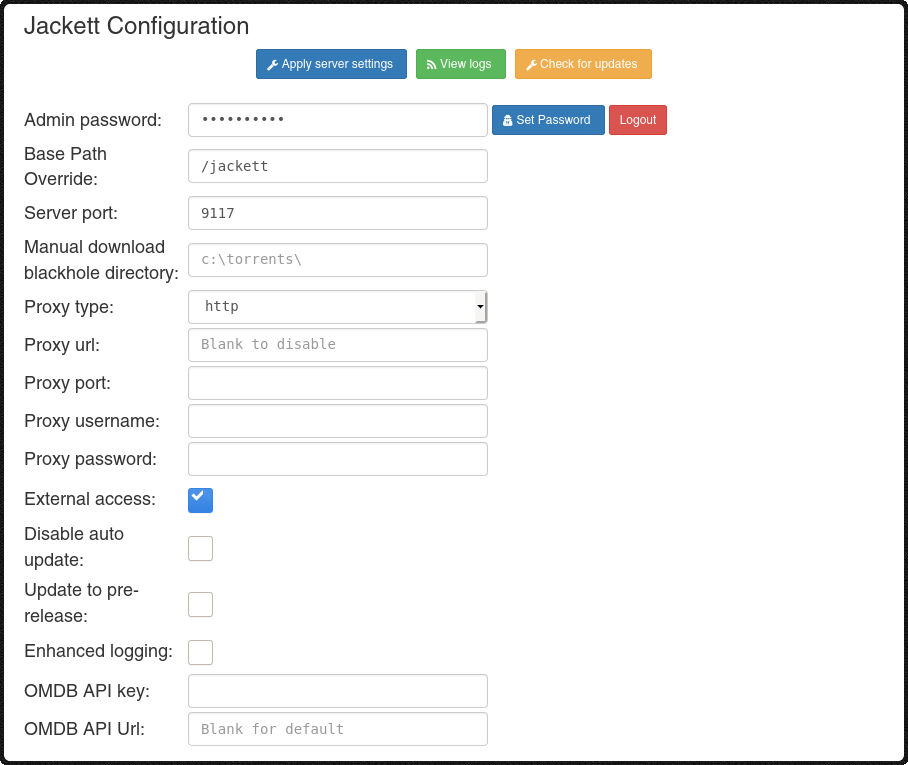
When running Jackett behind a reverse proxy, ensure that the original hostname of the request is passed to Jackett. If HTTPS is used, also set the X-Forwarded-Proto header to "https".
Important: Adjust the "Base path override" in Jackett settings accordingly.
Apache Configuration Example
< Location /jackett > ProxyPreserveHost On RequestHeader set X-Forwarded-Proto expr=%{ REQUEST_SCHEME } ProxyPass http:// 127 . 0 . 0 . 1 : 9117 ProxyPassReverse http:// 127 . 0 . 0 . 1 : 9117 </ Location >
Nginx Configuration Example
location /jackett { proxy_pass http :// 127.0.0.1:9117 ; proxy_set_header X-Real-IP $remote_addr ; proxy_set_header X-Forwarded-For $proxy_add_x_forwarded_for ; proxy_set_header X-Forwarded-Proto $scheme ; proxy_set_header X-Forwarded-Host $http_host ; proxy_redirect off ; }
Search Cache
Jackett has an internal cache to increase search speed and reduce the number of requests to torrent sites. The default values should be suitable for most users.
Configuration Options:
- Cache TTL (seconds): Default is 2100 (35 minutes). This indicates how long results can remain in the cache.
- Cache max results per indexer: Default is 1000. This limits how many results are kept in cache for each indexer to control RAM usage.
Note: If you make many requests and have sufficient memory, you can increase the maximum results. If you experience problems, you can reduce the TTL value or disable the cache. Be aware that making too many requests can result in being banned by tracker sites.
Torznab Cache
If you have enabled the Jackett internal cache but want to fetch fresh results for a specific query (ignoring the cache), add the &cache=false parameter to your Torznab query.
Example:
http://127.0.0.1:9117/api/v2.0/indexers/all/results/torznab/api?apikey=YOUR_API_KEY&t=search&q=query&cache=false
Configuring FlareSolverr
Some indexers are protected by Cloudflare or similar services, and Jackett cannot solve the challenges on its own. For these cases, FlareSolverr has been integrated into Jackett.
What is FlareSolverr: FlareSolverr is a proxy server that solves Cloudflare and other anti-bot challenges, then provides Jackett with the necessary cookies.
Setup Instructions:
- Install FlareSolverr service following their installation instructions
- Configure FlareSolverr in Jackett:
- Open Jackett settings
Set FlareSolverr API URL (e.g., http://172.17.0.2:8191 )- It is recommended to keep the default value in FlareSolverr Max Timeout (ms)
Note: Setting up this service is optional. Most indexers do not require it.
Configuring OMDb
This feature is used as a fallback when using the aggregate indexer to get the movie or series title if only the IMDB ID is provided in the request.
Setup Instructions:
- Request a free API key from OMDb
- Free tier allows 1,000 daily requests
- Paste the API key in Jackett settings
API Usage
Jackett Torznab Query Syntax
Jackett accepts Torznab queries following the specifications described in the Torznab specification document .
Basic Query Structure:
http://127.0.0.1:9117/api/v2.0/indexers/<indexer-name>/results/torznab/api?apikey=<your-api-key>&t=<search-type>&<parameters>
Examples:
Get indexer capabilities:
http://127.0.0.1:9117/api/v2.0/indexers/1337x/results/torznab/api?apikey=YOUR_API_KEY&t=caps
Perform a free text search:
http://127.0.0.1:9117/api/v2.0/indexers/1337x/results/torznab/api?apikey=YOUR_API_KEY&t=search&q=ubuntu
Search Modes and Parameters
Jackett supports the following search modes:
t=search (General Search)Parameters: q (query string)
Example:
.../api?apikey=YOUR_API_KEY&t=search&cat=100002,100003&q=Show+Title+S01E02
t=tvsearch (TV Search)Parameters: q , season , ep , imdbid , tvdbid , rid , tmdbid , tvmazeid , traktid , doubanid , year , genre
Examples:
.../api?apikey=YOUR_API_KEY&t=tvsearch&cat=5000&q=Show+Title&season=1&ep=2
.../api?apikey=YOUR_API_KEY&t=tvsearch&cat=5040,5045&genre=comedy&season=2023&ep=02/13
t=movie (Movie Search)Parameters: q , imdbid , tmdbid , traktid , doubanid , year , genre
Examples:
.../api?apikey=YOUR_API_KEY&t=movie&cat=100001&q=Movie+Title&year=2023
.../api?apikey=YOUR_API_KEY&t=movie&cat=2000&imdbid=tt1234567
t=music (Music Search)Parameters: q , album , artist , label , track , year , genre
Example:
.../api?apikey=YOUR_API_KEY&t=music&cat=100004&album=Title&artist=Name
t=book (Book Search)Parameters: q , title , author , publisher , year , genre
Example:
.../api?apikey=YOUR_API_KEY&t=book&cat=100005,100006&genre=horror&publisher=Stuff
Note: Most indexers will only support a subset of these search modes and parameters. Use t=caps to get a list of the actual modes and parameters supported by a specific indexer.
Filter Indexers
A special "filter" indexer is available at:
http://127.0.0.1:9117/api/v2.0/indexers/<filter>/results/torznab
It will query the configured indexers that match the filter expression criteria and return combined results as "all".
Supported Filters
Filter Condition
type:<type> Indexer type equals <type>
tag:<tag> Indexer tags contain <tag>
lang:<lang> Indexer language starts with <lang>
test:passed Last indexer test passed
test:failed Last indexer test failed
status:healthy Indexer successfully operated in recent minutes
status:failing Indexer generated errors in recent calls
status:unknown Indexer unused for a while
Supported Operators
Operator Condition
!<expr> NOT <expr>
<expr1>+<expr2> <expr1> AND <expr2>
<expr1>,<expr2> <expr1> OR <expr2>
Filter Examples
Example 1: Query indexers tagged with "group1" OR all non-private indexers with English language:
.../api/v2.0/indexers/tag:group1,!type:private+lang:en/results/torznab
Example 2: Query indexers that are not failing OR that passed their last test:
.../api/v2.0/indexers/!status:failing,test:passed/results/torznab
Aggregate Indexers
A special "all" indexer is available at:
http://127.0.0.1:9117/api/v2.0/indexers/all/results/torznab
It will query all configured indexers and return combined results.
Important Considerations
When to use the "all" indexer:
- Quick setup with fewer configuration steps
- Testing multiple indexers at once
Limitations of the "all" indexer:
- You lose control over indexer-specific settings (categories, search modes, etc.)
- Mixing search modes (IMDB, query, etc.) might cause low-quality results
- Indexer-specific categories (>= 100000) cannot be used
- Slow indexers will slow down overall results
- Total results are limited to 1000
Recommendation: If your client supports multiple feeds, add each indexer directly instead of using the "all" indexer for better control and performance.
Getting Indexer Information
To get all Jackett indexers including their capabilities:
.../api/v2.0/indexers/all/results/torznab/api?apikey=YOUR_API_KEY&t=indexers
To filter by configuration status:
.../api/v2.0/indexers/all/results/torznab/api?apikey=YOUR_API_KEY&t=indexers&configured=true .../api/v2.0/indexers/all/results/torznab/api?apikey=YOUR_API_KEY&t=indexers&configured=false
Command Line Switches
You can pass various options when running Jackett via the command line:
Windows Service Management
- -i, --Install - Install Jackett Windows service (requires administrator)
- -s, --Start - Start the Jackett Windows service (requires administrator)
- -k, --Stop - Stop the Jackett Windows service (requires administrator)
- -u, --Uninstall - Uninstall Jackett Windows service (requires administrator)
- -r, --ReserveUrls - Register Windows port reservations (required for listening on all interfaces)
Configuration Options
- -l, --Logging - Log all requests/responses to Jackett
- -t, --Tracing - Enable tracing
- -c, --UseClient - Override web client selection: automatic (default), httpclient , httpclient2
- -x, --ListenPublic - Listen publicly (accessible from other devices)
- -z, --ListenPrivate - Only allow local access (
— 本文由 AI 根据公开来源辅助整理,命令、版本与许可证请在使用前到原始页面复核。
安装 / 开始使用
- Installation
- Windows Installation
- Linux Installation (AMD x64)
- Linux Installation (ARMv7 or above)
- Linux Installation (ARMv6 or below)
- macOS Installation
Docker InstallationIntroduction Jackett works as a proxy server that translates queries from applications ( Sonarr , Radarr , SickRage , CouchPotato , Mylar3 , Lidarr , DuckieTV , qBittorrent , Nefarious , NZBHydra2 , etc.
) into tracker-site-specific HTTP queries, parses the HTML or JSON response, and sends results back to the requesting software. What Jackett does:
Key Features:
Developer Information This project is recruiting development help. If you can help out please contact us . For detailed troubleshooting and contributing guidelines, please see CONTRIBUTING.
md A third-party Golang SDK for Jackett is available from webtor-io/go-jackett Note: The Discord server is no longer maintained. If you have a problem, request, or question, please open a new issue on GitHub .
Supported Systems The currently supported version of Jackett is 0.24.+ , which is compatible with:
Prior versions of Jackett are no longer supported. Supported Trackers Supported Public Trackers
- Other Installation Methods
- Uninstallation
- Configuration
- Running Behind Reverse Proxy
- Search Cache
- Torznab Cache
- FlareSolverr Configuration
- OMDb Configuration
- API Usage
- Torznab Query Syntax
- Search Modes and Parameters
- Filter Indexers
- Aggregate Indexers
- Command Line Options
- Building from Source
- Troubleshooting
- Contributing
- Acts as a bridge between your apps and torrent trackers
- Provides recent uploads (similar to RSS feeds)
- Performs searches across multiple trackers
- Returns results in a standardized format (Torznab/TorrentPotato)
- Single repository of maintained indexer scraping and translation logic
- Removes the burden of tracker integration from other applications
- Supports public, semi-private and private trackers
- Implements the Torznab and TorrentPotato APIs
- Windows: Windows 10 Version 1607 or greater ( full list )
- Linux: Various distributions ( full list )
- macOS: macOS 13.0+ (Ventura) or greater ( full list )
- ØMagnet
- 1337x
- 52BT
- ACG.RIP
- Anibt
- AniLibria
- AniRena
- AniSource
- ApacheTorrent
- AudioBook Bay (ABB)
- Bangumi Moe
- BigFANGroup
- BlueRoms
- BT.etree
- BTdirectory (BT目录)
- Byrutor
- Catorrent
- CrackingPatching
- DaMagNet
- DivxTotal
- dmhy
- DonTorrent
- E-Hentai
- EBook Bay (EBB)
- EpubLibre
- ExtraTorrent.st
- EZTV
- FileMood
- Free JAV Torrent
- GamesTorrents
- HDRTorrent
- Internet Archive (archive.org)
- kickasstorrents.to
- kickasstorrents.ws
- Knaben
- LimeTorrents
- LinuxTracker
- Mac Torrents Download
- Magnet Cat
- MagnetDownload
- Magnetz