GitHub - roapi/roapi: Create full-fledged APIs for slowly moving datasets without writing a single line of code.
ROAPI ROAPI automatically spins up read-only APIs for static datasets without requiring you to write a single line of code. It builds on top of Apache Arrow and Datafusion . The core of its design can be boiled down to the following: - Query frontends to
社区作者 · zZz
它解决什么问题
ROAPI
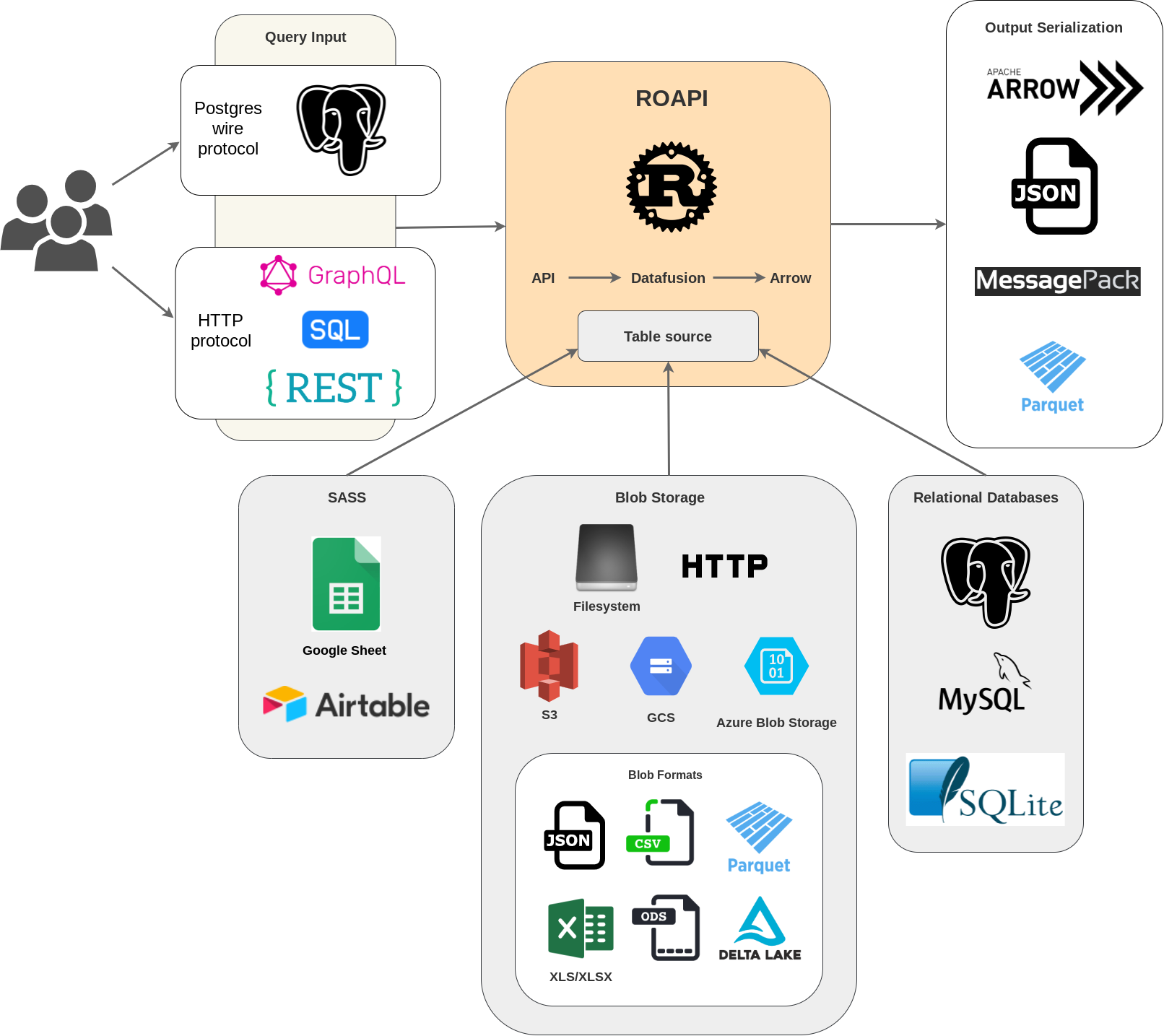
ROAPI automatically spins up read-only APIs for static datasets without requiring you to write a single line of code. It builds on top of Apache Arrow and Datafusion . The core of its design can be boiled down to the following:
translate SQL, FlightSQL, GraphQL and REST API queries into Datafusion plans.
- Query frontends to
- Datafusion for query plan execution.
to load datasets from a variety of sources and formats with automatic schema inference.
- Data layer
serialize intermediate Arrow record batch into various formats requested by client.
- Response encoding layer to
See below for a high level diagram:
Installation
Install pre-built binary
if you are using homebrew
brew install roapior if you prefer pip
pip install roapiCheck out Github release page for pre-built binaries for each platform. Pre-built docker images are also available at ghcr.io/roapi/roapi .
Install from source
cargo install --locked --git https://github.com/roapi/roapi --branch main --bins roapiUsage
Quick start
Spin up APIs for test_data/uk_cities_with_headers.csv and test_data/spacex_launches.json :
roapi \ --table " uk_cities=test_data/uk_cities_with_headers.csv " \ --table " test_data/spacex_launches.json "
Or using docker:
docker run -t --rm -p 8080:8080 ghcr.io/roapi/roapi:latest --addr-http 0.0.0.0:8080 \--table " uk_cities=test_data/uk_cities_with_headers.csv " \ --table " test_data/spacex_launches.json "
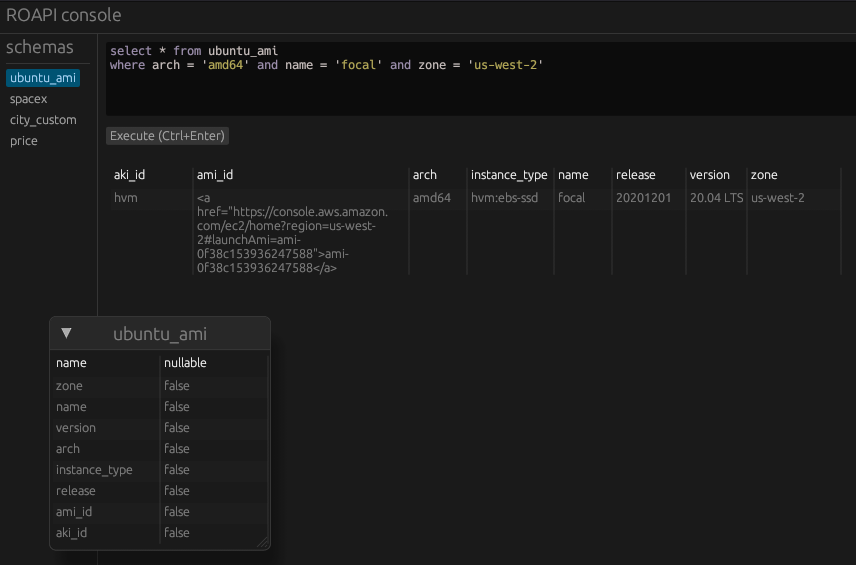
Query data using the builtin web UI at http://localhost:8080/ui :
Query data using SQL, GraphQL or REST via curl:
curl -X POST -d " SELECT city, lat, lng FROM uk_cities LIMIT 2 " localhost:8080/api/sqlcurl -X POST -d " query { uk_cities(limit: 2) {city, lat, lng} } " localhost:8080/api/graphqlcurl " localhost:8080/api/tables/uk_cities?columns=city,lat,lng&limit=2 "Get inferred schema for all tables:
curl ' localhost:8080/api/schema 'For MySQL and SQLite, specify the table argument like below:
--table "table_name=mysql://username:password@localhost:3306/database" --table "table_name=sqlite://path/to/database"
Want dynamic register data? Add parameter -d to command. --table parameter cannot be ignored for now.
roapi \ --table " uk_cities=test_data/uk_cities_with_headers.csv " \ -d
Then post config to /api/table register data.
curl -X POST http://172.24.16.1:8080/api/table \-H ' Content-Type: application/json ' \ -d ' [ { "tableName": "uk_cities2", "uri": "./test_data/uk_cities_with_headers.csv" }, { "tableName": "table_name", "uri": "sqlite://path/to/database" } ] '
For windows, full scheme(file:// or filesystem://) must filled, and use double quote(") instead of single quote(') to escape windows cmdline limit:
roapi \ --table " uk_cities=file://d:/path/to/uk_cities_with_headers.csv " \ --table " file://d:/path/to/test_data/spacex_launches.json "
Config file
You can also configure multiple table sources using YAML or Toml config, which supports more advanced format specific table options:
addr : http : 0.0.0.0:8080 postgres : 0.0.0.0:5433 tables :
uri : " test_data/blogs.parquet "
- name : " blogs "
uri : " test_data/ubuntu-ami.json " option : format : " json " pointer : " /aaData " array_encoded : true schema : columns :
data_type : " Utf8 "
data_type : " Utf8 "
data_type : " Utf8 "
data_type : " Utf8 "
data_type : " Utf8 "
data_type : " Utf8 "
data_type : " Utf8 "
data_type : " Utf8 "
- name : " ubuntu_ami "
- name : " zone "
- name : " name "
- name : " version "
- name : " arch "
- name : " instance_type "
- name : " release "
- name : " ami_id "
- name : " aki_id "
uri : " https://api.spacexdata.com/v4/launches " option : format : " json "
- name : " spacex_launches "
uri : " https://web.archive.org/web/20210507025928if_/https://jobs.github.com/positions.json "
- name : " github_jobs "
To run serve tables using config file:
roapi -c ./roapi.yml # or .toml
See config documentation for more options including using Google spreadsheet as a table source .
Response serialization
By default, ROAPI encodes responses in JSON format, but you can request different encodings by specifying the ACCEPT header:
curl -X POST \-H ' ACCEPT: application/vnd.apache.arrow.stream ' \ -d " SELECT launch_library_id FROM spacex_launches WHERE launch_library_id IS NOT NULL " \ localhost:8080/api/sql
REST API query interface
You can query tables through REST API by sending GET requests to /api/tables/{table_name} . Query operators are specified as query params.
REST query frontend currently supports the following query operators:
- columns
- sort
- limit
- filter
To sort column col1 in ascending order and col2 in descending order, set
query param to
sort=col1,-col2 .To find all rows with col1 equal to string 'foo' , set query param to: filter[col1]='foo' . You can also do basic comparisons with filters, for example predicate 0 <= col2 < 5 can be expressed as filter[col2]gte=0&filter[col2]lt=5 .
GraphQL query interface
To query tables using GraphQL, send the query through POST request to /api/graphql endpoint.
GraphQL query frontend supports the same set of operators supported by REST query frontend . Here how is you can apply various operators in a query:
{ table_name ( filter : { col1 : false , col2 : { gteq : 4 , lt : 1000 } } sort : [{ field : " col2 " , order : " desc " }, { field : " col3 " }] limit : 100 ) { col1 col2 col3 } }
SQL query interface
To query tables using a subset of standard SQL, send the query through POST request to /api/sql endpoint. This is the only query interface that supports table joins.
Key value lookup
You can pick two columns from a table to use a key and value to create a quick keyvalue store API by adding the following lines to the config:
kvstores :
uri : " test_data/spacex_launches.json " key : id value : name
- name : " launch_name "
Key value lookup can be done through simple HTTP GET requests:
curl -v localhost:8080/api/kv/launch_name/600f9a8d8f798e2a4d5f979eStarlink-21 (v1.0)%
Query through Postgres wire protocol
ROAPI can present itself as a Postgres server so users can use Postgres clients to issue SQL queries.
$ psql -h 127.0.0.1 psql (12.10 (Ubuntu 12.10-0ubuntu0.20.04.1), server 13) WARNING: psql major version 12, server major version 13. Some psql features might not work. Type " help " for help.
houqp= > select count(*) from uk_cities ; COUNT(UInt8(1)) ----------------- 37 (1 row)
Features
Query layer:
- REST API GET
- GraphQL
- SQL
- join between tables
- access to array elements by index
- access to nested struct fields by key
- column index
- protocol
- Postgres
- FlightSQL
- Key value lookup
Response serialization:
- JSON application/json
- Arrow application/vnd.apache.arrow.stream
- Parquet application/vnd.apache.parquet
- msgpack
Data layer:
- filesystem
- HTTP/HTTPS
- S3
- GCS
- Azure Storage
- Google spreadsheet
- MySQL
- SQLite
- Postgres
- Airtable
- Data format
- CSV
- JSON
- NDJSON
- parquet
- xls, xlsx, xlsb, ods: https://github.com/tafia/calamine
- DeltaLake
Misc:
- auto gen OpenAPI doc for rest layer
- query input type conversion based on table schema
- stream arrow encoding response
- authentication layer
Development
The core of ROAPI, including query front-ends and data layer, lives in the self-contained columnq crate. It takes queries and outputs Arrow record batches. Data sources will also be loaded and stored in memory as Arrow record batches.
The roapi crate wraps columnq with a multi-protocol query layer. It serializes Arrow record batches produced by columnq into different formats based on client request.
Debug
To log all FlightSQL requests in console, set RUST_LOG=tower_http=trace .
Build Docker image
docker build --rm -t ghcr.io/roapi/roapi:latest .VS Code DevContainer
Requirements
- Vscode
- Ensure this extension is installed on your vs code ms-vscode-remote.remote-containers
Once done you will see prompt from left side to reopen the project in dev container or open command palette and search for open with remote container:
- install dependencies
apt-get update && apt-get install --no-install-recommends -y cmake- connect to database from your local using db client of choice using the following credentials
username: user password: user database: test
once done create table so you can map it in -t arg or consider using sample in .devcontainer/db-migration.sql to populate some tables with data
- run cargo command with mysql db as feature
cargo run --bin roapi --features database -- -a localhost:8080 -t posts=mysql://user:user@db:3306/testotherwise if you are looking for other features you have to select appropriate one from roapi/Cargo.toml
— 本文由 AI 根据公开来源辅助整理,命令、版本与许可证请在使用前到原始页面复核。
安装 / 开始使用
Installation Install pre-built binary
if you are using homebrew
brew install roapior if you prefer pip
pip install roapiCheck out Github release page for pre-built binaries for each platform. Pre-built docker images are also available at ghcr.io/roapi/roapi . Install from source
cargo install --locked --git https://github.com/roapi/roapi --branch main --bins roapiUsage Quick start Spin up APIs for test_data/uk_cities_with_headers.csv and test_data/spacex_launches.json : roapi \ --table " uk_cities=test_data/uk_cities_with_headers.csv " \ --table " test_data/spacex_launches.json " Or using docker:
docker run -t --rm -p 8080:8080 ghcr.io/roapi/roapi:latest --addr-http 0.0.0.0:8080 \--table " uk_cities=test_data/uk_cities_with_headers.csv " \ --table " test_data/spacex_launches.json " Query data using the builtin web UI at http://localhost:8080/ui : Query data using SQL, GraphQL or REST via curl:
curl -X POST -d " SELECT city, lat, lng FROM uk_cities LIMIT 2 " localhost:8080/api/sqlcurl -X POST -d " query { uk_cities(limit: 2) {city, lat, lng} } " localhost:8080/api/graphqlcurl " localhost:8080/api/tables/uk_cities?columns=city,lat,lng&limit=2 "Get inferred schema for all tables:
curl ' localhost:8080/api/schema 'For MySQL and SQLite, specify the table argument like below: --table "table_name=mysql://username:password@localhost:3306/database" --table "table_name=sqlite://path/to/database" Want dynamic register data? Add parameter -d to command.
--table parameter cannot be ignored for now. roapi \ --table " uk_cities=test_data/uk_cities_with_headers.csv " \ -d Then post config to /api/table register data.
curl -X POST http://172.24.16.1:8080/api/table \-H ' Content-Type: application/json ' \ -d ' [ { "tableName": "uk_cities2", "uri": "./test_data/uk_cities_with_headers.
csv" }, { "tableName": "table_name", "uri": "sqlite://path/to/database" } ] ' For windows, full scheme(file:// or filesystem://) must filled, and use double quote(") instead of single quote(') to escape windows cmdline limit: roapi \ --table " uk_cities=file://d:/path/to/uk_cities_with_headers.
csv " \ --table " file://d:/path/to/test_data/spacex_launches.json " Config file You can also configure multiple table sources using YAML or Toml config, which supports more advanced format specific table options: addr : http : 0.0.0.0:8080 postgres : 0.0.0.
0:5433 tables :
uri : " test_data/blogs.parquet "
uri : " test_data/ubuntu-ami.json " option : format : " json " pointer : " /aaData " array_encoded : true schema : columns :
data_type : " Utf8 "
data_type : " Utf8 "
data_type : " Utf8 "
data_type : " Utf8 "
data_type : " Utf8 "
data_type : " Utf8 "
data_type : " Utf8 "
data_type : " Utf8 "
uri : " https://api.spacexdata.com/v4/launches " option : format : " json "
- name : " blogs "
- name : " ubuntu_ami "
- name : " zone "
- name : " name "
- name : " version "
- name : " arch "
- name : " instance_type "
- name : " release "
- name : " ami_id "
- name : " aki_id "
- name : " spacex_launches "