GitHub - tagspaces/tagspaces: TagSpaces is an offline, open source, document manager with tagging support
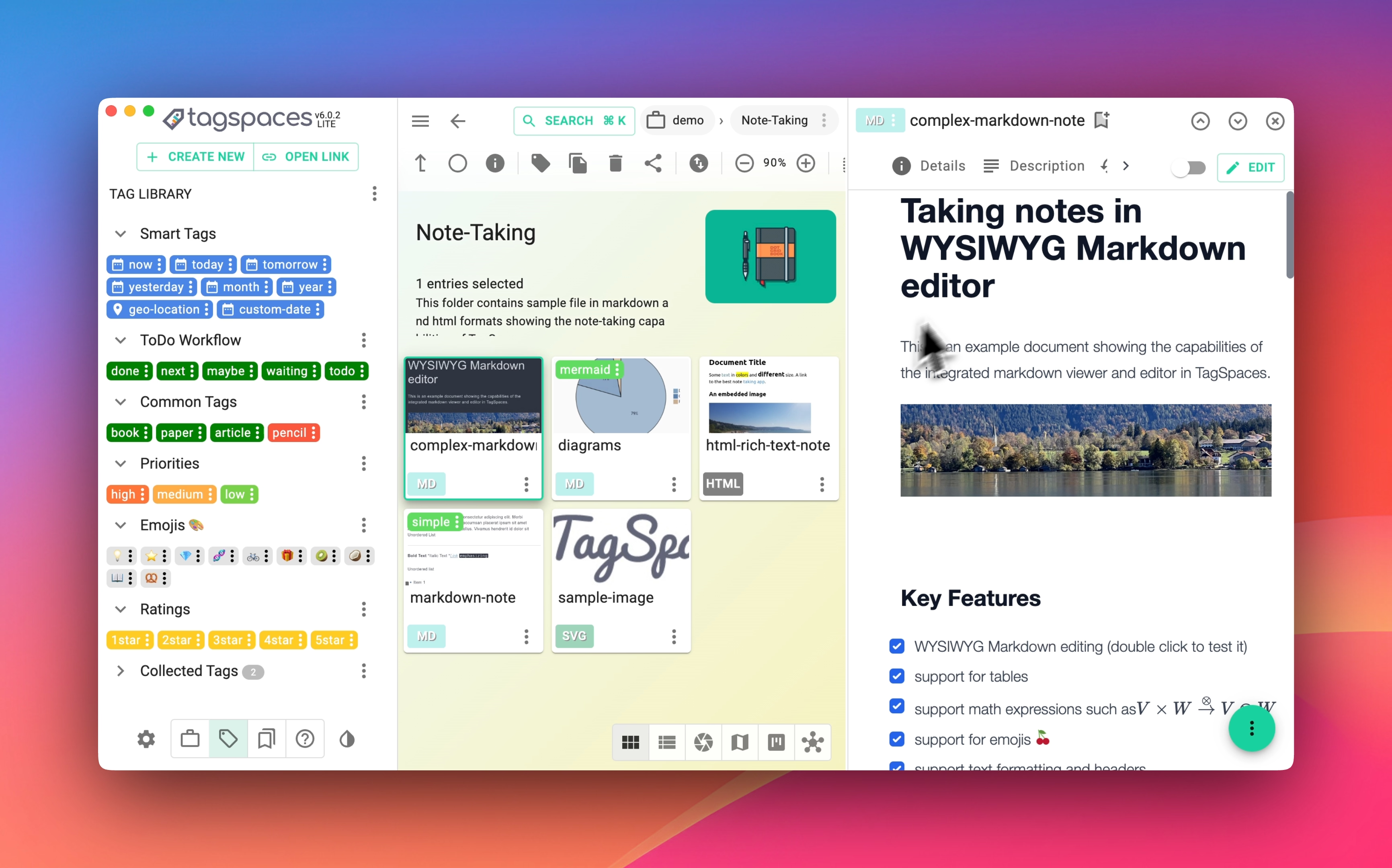
TagSpaces TagSpaces is a free and open-source platform for organizing, tagging, and managing your local files. It runs completely offline, with no need for cloud services, internet connection, or vendor lock-in. Available for Windows , Linux , and macOS , it
社区作者 · zZz
它解决什么问题
TagSpaces
TagSpaces is a free and open-source platform for organizing, tagging, and managing your local files. It runs completely offline, with no need for cloud services, internet connection, or vendor lock-in.
Available for Windows , Linux , and macOS , it also includes a browser extension (Web Clipper) for Firefox, Edge, and Chrome to capture online content as local files.
🌐 Learn More
- 🌍 Website
- 📰 Blog
- 📚 Documentation
- 💬 Community Forum
- 🐛 GitHub Issues
📦 Downloads
Grab the latest release from the GitHub Releases Page .
Check out the full changelog for recent updates.
🚀 Features at a Glance
- File & Folder Management – Browse, organize, and manage local files in a powerful interface.
- Tagging System – Add tags directly into filenames or use sidecar files for metadata storage.
- Flexible Search – Filter and find files by name or tags using fuzzy search.
- Offline First – 100% offline, serverless, and privacy-focused.
- Cross-platform – Runs seamlessly on Windows, Linux, and macOS.
- Note Taking – Create notes in TXT, Markdown, or HTML.
- To-Do Support – Manage task lists using the built-in HTML editor.
- Media Player – Play common audio and video formats directly within the app.
- Web Clipper – Save web pages or screenshots locally using our browser extension.
👩💻 Developer Guide
🛠️ Technologies
- Javascript Framework: React.js
- User Interface Styling: MUI
- Desktop App Framework: Electron
- Boilerplate: Electron React Boilerplate
📁 Project Structure
src/ renderer/ # Core application logic main/ # Electron main process locales/ # Language translation files node_modules/ # TagSpaces extension modules
capacitor/ # Mobile (Android/iOS) build dll/ # Live reload support for development docker/ # Docker container setup internals/ # Flow and ESLint configurations resources/ # Images and build resources scripts/ # NPM task-related scripts test/ # Unit and E2E tests web/ # Assets for web version
▶️ Running from Source
Prerequisites
Install the following tools:
- Node.js
npmGitSetup Steps
git clone https://github.com/tagspaces/tagspaces.gitcd tagspacesgit checkout develop # or 'master' for stable releasenpm installSet Up Local Web ServiceCreate a .env file in release/app/ with a custom key to avoid conflicts:
The desktop version of the application uses a web service which is running locally as a separate process. The web service is responsible for the search index creation and the generation of the thumbnails for most of the images formats.
A key is required in order for the main application to communicate with the web server. It should be generated from webpack script in the .env file located in release/app folder. This is an example for an .env file.
KEY=a_custom_keyHaving a custom key, ensures that another instance of TagSpaces will not communicate with the web service of the initial instance, since it is always running on the same port.
Build & Start
npm run buildnpm run startStart in Development Mode
npm run devThis will start a development server in background, which watches for changes in background and refreshes the application automatically once you have done some changes in the source code.
🧪 Testing
Run unit and integration tests:
npm run test-unitnpm run test-playwrightnpm run test-playwright-web💻 Packaging the Desktop App
Build native apps for each platform:
npm run package-winnpm run package-linuxnpm run package-macnpm run package-mac-arm64The commands will create packages for Windows, Linux, Mac OS and Mac OS with the M1 processor respectively.
⚠️ Run npm run build before packaging.
📱 Mobile Build (Capacitor)
Build and run the Android or iOS app via Capacitor:
npm run run-android-capnpm run run-ios-cap🌐 Web Version
Start the web version locally:
npm run run-web🔌 Extend with Custom Viewers & Editors
TagSpaces supports extension modules for opening and editing different file types. Learn more on our Extensions Page .
🤝 Contributing
We welcome contributions! See CONTRIBUTING.md , and review and sign the Contributor License Agreement (CLA) before submitting PRs.
🌍 Localization
TagSpaces is available in over 20 languages. Help us translate the app by joining our team on Transifex .
💡 Ideas & Suggestions
Have an idea or a feature request? Share it on our community forum and join the discussion.
🐞 Support & Bug Reports
If you encounter a bug or need help, open an issue on GitHub.
⚠️ Known Limitations
TagSpaces is not optimized for locations with more than 100,000 files.
📡 Feeds
- Blog RSS Feed
- GitHub Commits (master)
📄 License
TagSpaces is dual-licensed under the AGPL (GNU Affero General Public License) v3 for open-source projects and a commercial license for vendors or resellers. Contact us if you're interested in using TagSpaces under different terms.
The TagSpaces Pro components ( tagspacespro/ ) are proprietary and governed by a separate EULA. For the full picture — the open-source/proprietary boundary, how the combined builds are distributed, and third-party notices — see LICENSING.md .
— 本文由 AI 根据公开来源辅助整理,命令、版本与许可证请在使用前到原始页面复核。
安装 / 开始使用
Install the following tools:
- Node.js
npmGitSetup Steps
git clone https://github.com/tagspaces/tagspaces.gitcd tagspacesgit checkout develop # or 'master' for stable releasenpm installSet Up Local Web ServiceCreate a .env file in release/app/ with a custom key to avoid conflicts: The desktop version of the application uses a web service which is running locally as a separate process.
The web service is responsible for the search index creation and the generation of the thumbnails for most of the images formats. A key is required in order for the main application to communicate with the web server.
It should be generated from webpack script in the .env file located in release/app folder. This is an example for an .env file.
KEY=a_custom_keyHaving a custom key, ensures that another instance of TagSpaces will not communicate with the web service of the initial instance, since it is always running on the same port. Build & Start
npm run buildnpm run startStart in Development Mode
npm run devThis will start a development server in background, which watches for changes in background and refreshes the application automatically once you have done some changes in the source code. 🧪 Testing Run unit and integration tests:
npm run test-unitnpm run test-playwrightnpm run test-playwright-web💻 Packaging the Desktop App Build native apps for each platform:
npm run package-winnpm run package-linuxnpm run package-macnpm run package-mac-arm64The commands will create packages for Windows, Linux, Mac OS and Mac OS with the M1 processor respectively. ⚠️ Run npm run build before packaging. 📱 Mobile Build (Capacitor) Build and run the Android or iOS app via Capacitor:
npm run run-android-capnpm run run-ios-cap🌐 Web Version Start the web version locally:
npm run run-web🔌 Extend with Custom Viewers & Editors TagSpaces supports extension modules for opening and editing different file types. Learn more on our Extensions Page . 🤝 Contributing We welcome contributions! See CONTRIBUTING.
md , and review and sign the Contributor License Agreement (CLA) before submitting PRs. 🌍 Localization TagSpaces is available in over 20 languages. Help us translate the app by joining our team on Transifex .
💡 Ideas & Suggestions Have an idea or a feature request? Share it on our community forum and join the discussion. 🐞 Support & Bug Reports If you encounter a bug or need help, open an issue on GitHub.
⚠️ Known Limitations TagSpaces is not optimized for locations with more than 100,000 files. 📡 Feeds
📄 License TagSpaces is dual-licensed under the AGPL (GNU Affero General Public License) v3 for open-source projects and a commercial license for vendors or resellers. Contact us if you're interested in using TagSpaces under different terms.
The TagSpaces Pro components ( tagspacespro/ ) are proprietary and governed by a separate EULA. For the full picture — the open-source/proprietary boundary, how the combined builds are distributed, and third-party notices — see LICENSING.md .
- Blog RSS Feed
- GitHub Commits (master)